
TL;DR: Bank statement reconciliation is the process of comparing your internal financial records against your bank's records to find and fix discrepancies, ensuring your cash balance is accurate. Businesses that perform monthly reconciliations reduce financial errors by 75% and detect fraud 60% faster, according to the cited 2024 PwC survey in Margin Authority's summary. Done well, reconciliation gives you clean books, a reliable cash number, and fewer surprises at month-end.
You usually realize you need reconciliation at the worst moment. The accounting software shows one cash balance. The bank shows another. Payroll is coming up, a vendor wants payment, or your lender just asked for updated statements, and suddenly a small mismatch becomes the only thing you can think about.
That’s what bank statement reconciliation fixes. It’s the discipline of proving your cash balance is real, not assumed. If you’ve ever balanced a personal checkbook, the logic is the same. The difference is that a business has more moving parts, more transaction volume, and a much higher cost when something is wrong.
The Month-End Mystery Where Did the Money Go
It’s 5:30 on the last business day of the month. Payroll hits tomorrow. Your accounting file says you have $84,260 in cash. The bank statement says $71,914. A client deposit is missing, two ACH debits look unfamiliar, and a service charge never made it into the books. Now the question is not abstract. Which number can you use?
What is bank statement reconciliation? It is the process of matching your cash records to the bank’s records, transaction by transaction when needed, until every difference is identified and explained. The end result is simple. The adjusted bank balance and the adjusted book balance agree.
Reconciliation became standard practice for a practical reason. Cash is the account that causes the fastest damage when it is wrong. If revenue is misclassified, you may catch it later in review. If cash is overstated, you can overpay vendors, miss payroll timing, bounce an auto-debit, or hand a lender numbers you cannot support. I have seen businesses spend hours chasing a “missing” $12,000 that turned out to be a deposit in transit, and I have seen a $35 bank fee snowball into a messy close because nobody posted it and nobody checked.
The same pressure shows up outside a normal month-end close. Individuals applying for visas, borrowers sending statements to underwriters, and professionals preparing compliance files often work from messy PDFs, non-standard statement layouts, and partial date ranges. In those cases, reconciliation is not just an accounting exercise. It is how you prove the statement, the ledger, and the reported balance all tell the same story.
Practical rule: If you cannot explain the difference between the bank balance and the book balance, you do not have a reliable cash number.
Here is what reconciliation answers in real life:
- Can I use this cash number to make decisions today? Only if timing differences and missing entries are accounted for.
- Did the bank post everything correctly? Banks make errors, and ACH activity, reversals, and duplicate charges do happen.
- Did we miss transactions in the books? Fees, interest, loan payments, merchant deposits, returns, and NSF items often show up here first.
- Can we close the month without carrying confusion into next month? You cannot streamline your monthly accounting close process if cash is still unresolved.
- Can I defend these numbers to a lender, auditor, attorney, or immigration officer? Clean reconciliation gives you that support.
If the underlying document itself is causing confusion, review what a bank statement actually shows. That clears up a common problem. People often mix up the statement, the reconciliation workpaper, and the final cash balance they should rely on.
Reconciliation is one of the most practical controls in finance. It tells you whether the cash figure in your books is usable, or just hopeful.
Why Reconciliation Is a Strategic Business Tool
A business owner approves a vendor payment in the morning, sees a healthy bank balance at lunch, and learns by Friday that payroll is tighter than expected because a loan draft, merchant fee batch, and two uncleared customer refunds were never reflected correctly in the books. That is not a bookkeeping inconvenience. It is a decision problem.

Reconciliation matters because cash drives timing. Hiring, inventory purchases, tax payments, debt service, owner draws, and vendor terms all depend on whether the cash number is real. If the books are off by even a few thousand dollars, a small business can make the wrong call fast.
Cash visibility gives you room to act
A reconciled cash balance gives management a usable number, not a rough guess based on the online banking screen. Bank balances miss outstanding checks, pending transfers, batched card deposits, bank fees, interest, and posting delays. The ledger misses items too, especially in businesses with multiple payment apps, loan accounts, or inconsistent bookkeeping during a busy month.
That gap has real consequences. I have seen owners delay inventory orders because they did not trust the cash number, and I have seen others spend too aggressively because the bank account looked higher than the true available cash. Reconciliation fixes that by separating timing issues from actual errors.
Problems surface while they are still small
Most cash problems do not start as obvious fraud or obvious accounting mistakes. They start as a duplicate ACH, a stale check that should have been voided, a loan payment split incorrectly between principal and interest, or a deposit posted to the wrong customer.
Monthly reconciliation forces review at the transaction level. That is how businesses catch errors before quarter-end, before tax prep, and before a lender asks for support. It is also how individuals and professionals deal with messy statements used for loan files, visa applications, legal matters, or compliance reviews. In those cases, unexplained transfers, inconsistent descriptions, and missing entries create delays even when the money itself is legitimate.
Reporting quality rises with clean cash
Every financial statement depends on cash being right. If cash is wrong, the balance sheet is wrong. Often the profit and loss is affected too, because missing fees, interest, returns, and payment reversals eventually hit income or expense accounts.
That matters well beyond tax season. Lenders want support for balances. Buyers and investors ask follow-up questions when cash activity looks messy. Auditors and controllers look for old reconciling items because they often point to weak processes. Even a solo professional trying to document funds for immigration or underwriting runs into the same issue. If the statement is hard to read and the transaction history is not organized, proving the story behind the balance becomes slow and expensive.
This is why many firms now pair reconciliation with automated data entry software for bank statements and finance teams. Better source data means fewer coding mistakes, faster review, and cleaner support when someone asks for documentation later.
Reconciliation strengthens internal control
Cash usually moves faster than any other account. It is also the account where bad habits show up first. A regular reconciliation process creates accountability because someone has to explain what cleared, what did not, what needs correction, and who reviewed the work.
The strongest process is usually simple:
- A fixed schedule: weekly for high-volume accounts, monthly at minimum
- Clear ownership: one person prepares, another reviews when staffing allows
- Aging of old items: anything lingering needs an explanation, not a shrug
- Document support: fees, transfers, loan activity, and unusual withdrawals should be traceable
- Clean imports: messy statement data creates messy reconciliations
What fails is just as predictable. Teams rely on the bank feed and assume it is complete. Owners trust the balance in the app without checking what has not posted. Old reconciling items roll forward for months until nobody remembers what they were. At that point, reconciliation stops being a control and turns into cleanup.
Done well, reconciliation protects cash, improves reporting, and gives the business owner something rare in small business finance: a number they can use.
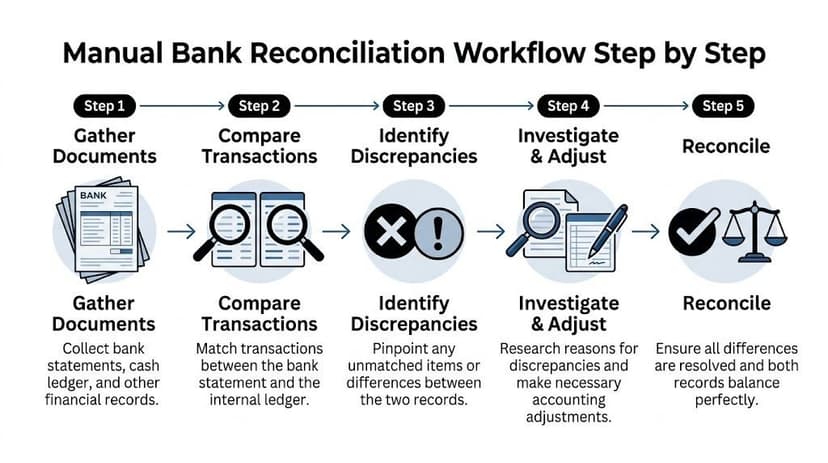
The Manual Bank Reconciliation Workflow Step by Step
A manual reconciliation usually starts the same way. The bank statement says one number, the books say another, and someone has to prove where the gap came from before close, a loan review, or a visa file deadline.
Manual work still matters because it teaches you how cash moves, where errors enter the process, and which exceptions software should flag later. I still want staff to understand the logic before they trust a matching tool.
Gather the right records first
Pull the bank statement for the exact period, the cash general ledger or cash book for the same dates, and the prior reconciliation. Old items have a habit of carrying forward, especially if nobody cleared or explained them last month.
Check the opening balance before you match a single line. If the starting balance is off by even one uncleared item, the rest of the file turns into guesswork. That is why many accountants still keep a standard bank reconciliation format in Excel alongside the accounting system. It gives you a clean schedule, space for notes, and support a reviewer can follow without clicking through five screens.
This step matters even more outside routine month-end work. Individuals preparing loan packages, immigration files, or compliance submissions often receive statements in inconsistent formats, with missing descriptions or odd date layouts. If the source records are messy, organize them first.
Match the transactions that are obvious
Start with the clean matches. Compare bank activity to the books using four fields:
- Date
- Amount
- Description
- Reference or check number
Cleared checks, straightforward ACH payments, and deposits for the same amount usually match fast. Mark those first.
Then slow down. Merchant processors often batch several customer payments into one bank deposit. Loan payments may split between principal and interest. One transfer can appear as two lines on the bank statement but one entry in the ledger. Experienced judgment saves time later. A rushed match creates fake differences that someone else has to unwind.
Classify the unmatched items
After the easy matches, the remaining items need labels before they need fixes.
Use plain categories:
- Deposit in transit
- Outstanding check
- Bank fee or bank credit not recorded in the books
- Book error
- Bank error
- Duplicate or missing entry
A deposit in transit means the business recorded the money, but the bank posted it after period-end. An outstanding check means the books show the payment, but the bank has not cleared it yet. Those are timing items. They do not need a correction entry unless they stay old long enough to become suspicious.
That distinction saves a lot of bad cleanup work.
Record what the bank posted but the books missed
Banks do not wait for your staff to catch up. Service charges, interest, loan auto-debits, wire fees, NSF items, and card processing adjustments can hit the statement without any matching book entry.
When that happens, investigate the source, decide the proper coding, and post the entry to the books. In practice, many small businesses often find recurring charges they forgot about, duplicate subscriptions, or debt payments that were never broken out correctly between interest and principal.
For individuals and professionals working from downloaded PDFs, this step is often harder than it should be. Non-standard statements can hide fees, reversals, and loan deductions in formats that are hard to read line by line. The reconciliation logic is the same, but poor statement structure makes manual review much slower.
Build the adjusted balances
The reconciliation is complete when the adjusted bank balance equals the adjusted book balance.
Use this sequence:
- Start with the bank statement ending balance.
- Add deposits in transit.
- Subtract outstanding checks and other uncleared payments.
- Start with the book balance.
- Add or subtract unrecorded bank items and corrections.
- Confirm both adjusted balances agree.
A simple example makes it easier to see. Assume the bank statement ends at $13,010. The books include a $1,200 deposit made on the last day of the month that did not post to the bank until the next day. There are also $1,750 of checks still outstanding. The adjusted bank balance becomes $12,460. If, after posting any missing bank fees, interest, or corrections, the book balance also lands at $12,460, the account reconciles.
Finish with a file another person can review
A good reconciliation file should show:
- Statement ending balance
- Book ending balance
- Each reconciling item with explanation
- Any journal entries posted
- Supporting documents for unusual items
- Preparer and reviewer sign-off
This is the part many teams skip when they are busy, and it always costs them later. Next month’s reconciliation depends on this month’s unresolved items being carried forward clearly. The same documentation also matters when a lender, auditor, attorney, or immigration officer asks why a balance changed or where a withdrawal came from.
Manual reconciliation works well at lower volume and with clean statements. It gets expensive fast when transaction counts rise, statements arrive in inconsistent formats, or the account includes loans, transfers, foreign transactions, or compliance-driven documentation requests. That is usually the point where teams stop asking whether automation is helpful and start asking how soon they can put it in place.
Solving Common Reconciliation Discrepancies
The hard part of reconciliation is rarely the math. It is the stack of items that do not match cleanly, the ones that sit in limbo because nobody is sure whether they are timing, error, or something worse.
A $37 bank fee is easy to miss. A $3,700 duplicate wire is not. Both create the same month-end problem if they are left unresolved, and both can matter later when a lender, auditor, visa officer, or compliance reviewer asks for a clear explanation tied back to source documents.
The quickest way to troubleshoot
Start with the difference itself. The pattern usually tells you where to look first.
- Only on the bank statement: The books likely missed a fee, interest posting, loan debit, transfer, or automatic payment.
- Only in the books: It is often a timing item, such as a deposit in transit or a payment that has not cleared yet.
- Close, but not exact: Check for transposed digits, partial postings, split transactions, or tax and fee components recorded separately.
- Repeated pattern: Look for duplicate imports, recurring coding mistakes, or a rule in the accounting system posting to the wrong account every month.
- Messy source document: Poor scans and inconsistent statement layouts create bad imports and false mismatches. That is why OCR in banking workflows matters for finance teams and for individuals working with loan files, immigration records, or compliance packets built from non-standard statements.
One practical rule helps: if the number looks random, investigate the source. If it matches a known charge, clearing pattern, or recurring transfer, test that explanation first.
Common Reconciliation Problems and Solutions
| Discrepancy | Likely Cause | How to Fix It |
|---|---|---|
| Outstanding check | Payment recorded in the books but not yet cleared by the bank | Keep it as a reconciling item on the bank side and verify that it clears in the next statement period |
| Deposit in transit | Receipt recorded before the bank processed it | Leave it as a timing difference and confirm the deposit posts after period-end |
| Unrecorded bank fee | Bank deducted a service charge that never hit the ledger | Post the expense in the books and reduce cash |
| Interest credit not booked | Bank added interest that was never recorded internally | Enter the income in the books so the cash balance agrees |
| NSF item | Customer payment bounced after it was recorded as received | Reverse the receipt and restore the receivable, or correct the original entry if it was posted wrong |
| Duplicate entry | Transaction entered twice or imported twice | Reverse the duplicate and keep support showing which entry is valid |
| Amount mismatch | Typing error, transposed digits, partial match, or wrong date | Trace it to source support and post the correcting entry |
| Unknown bank withdrawal | Automatic debit, loan payment, fraud risk, or miscoded transfer | Investigate right away, record it correctly if legitimate, or escalate it if suspicious |
What experienced reviewers look for
Experienced reviewers go straight to the exceptions. They look for stale checks, deposits that never clear, vague descriptions like "adjustment," and journal entries with no support.
That is where weak reconciliations show up.
An unresolved item is not automatically a problem. An unresolved item with no explanation, no owner, and no follow-up date is a problem. I see this often with owner draws, inter-account transfers, loan autopayments, and bank activity pulled from statements that were exported poorly or keyed in by hand.
The same issue shows up outside business bookkeeping. Individuals preparing statements for mortgage underwriting, visa applications, divorce proceedings, or source-of-funds reviews often have transactions that are perfectly legitimate but poorly labeled. If the reconciliation file does not explain those items clearly, the reviewer is left to guess. Guessing usually slows approval down.
A reconciliation is only as good as the support behind the exceptions.
Fix the books, not just the worksheet
A spreadsheet can make the account appear reconciled while the ledger stays wrong. That happens when someone plugs the difference in a worksheet, notes a fee or correction in comments, and never posts the actual entry.
The fix is straightforward. If the discrepancy belongs on the book side, record the journal entry in the accounting system and attach support. If it belongs on the bank side as a true timing difference, carry it forward and confirm that it clears. If the item is still unexplained after review, flag it for escalation instead of hiding it under a catch-all label.
That discipline matters more than teams expect. Small unresolved items turn into old reconciling items, old reconciling items turn into close delays, and close delays turn into credibility problems when someone outside the business asks for a clean statement trail.
A Reconciliation Checklist and Best Practices
A sound reconciliation process isn’t built on effort alone. It’s built on habits that make errors harder to introduce and easier to catch.

The businesses that keep cash clean usually follow a routine that’s not glamorous at all. They reconcile on a schedule, verify the starting point, separate preparation from review, and keep support in one place. That consistency matters more than fancy templates.
The working checklist
Use this as a practical control list, not just a box-ticking exercise:
- Verify the opening balance: Make sure the beginning balance matches the prior period’s completed reconciliation.
- Use the correct statement period: Don’t mix transactions from overlapping dates or partial downloads.
- Match transactions carefully: Compare date, amount, payee, and reference details before calling something matched.
- Post book-side adjustments promptly: Fees, interest, returns, and corrections belong in the accounting system, not only in your notes.
- Track unresolved timing items: Outstanding checks and deposits in transit need follow-up, not endless rollforward.
- Require review: The person who prepares the reconciliation shouldn’t be the only one who signs off on it.
- Save support with the rec: Statement, ledger detail, journal entries, and notes should stay together.
- Investigate unusual items immediately: Unknown withdrawals and repeated mismatches shouldn’t wait until next month.
Frequency matters more than most owners think
For many small businesses, monthly is the practical minimum. That cadence keeps the work manageable and catches problems before they spread into tax filings, management reports, or lender packages.
Higher-volume teams often move more frequently. Bank feeds and connected accounting systems make that easier. The point isn’t to chase perfection every day. The point is to shorten the time between a bad transaction appearing and someone noticing it.
Internal controls that actually help
Small teams sometimes resist formal controls because they sound corporate. In practice, even simple separation of duties helps. One person prepares. Another person reviews. That single change improves both accuracy and accountability.
A good review isn’t just “looks fine.” It checks whether the support exists, whether the reconciling items make sense, and whether aged items are being cleared or just carried forever.
Reviewer check: Ask for support on the oldest open item first. If nobody can explain that one, the rest of the reconciliation probably needs another pass.
Documentation is part of the process
A reconciliation isn’t complete when the numbers tie. It’s complete when another person can understand how they tied. That means clear labels, clear support, and enough notes that you’re not reconstructing the logic later from memory.
This matters for audits, but it also matters for ordinary turnover. If your bookkeeper is out, if your CPA asks questions, or if a lender requests support, a documented reconciliation saves time and reduces stress. Cash is too important to leave dependent on one person’s recollection.
How Automation Eliminates Reconciliation Headaches
Manual reconciliation has two main weaknesses. First, it takes too long. Second, it depends too much on the quality of the source data before the actual reconciliation even begins.

That second point gets overlooked. Many reconciliation problems start before matching. They start when the bank statement is a scanned PDF, a multi-page image, a foreign-language file, or a layout nobody on the team has seen before. People then copy and paste, retype transactions, or clean data manually. By the time they begin reconciling, they’ve already introduced risk.
Where manual work breaks down
This is especially obvious in firms and document-heavy workflows. Manual reconciliation of non-standard PDFs from over 2,000 global banks can take professionals 12+ hours weekly, with error rates of up to 20% on low-quality scans, according to the pain points summarized by Ramp’s bank reconciliation article. The same source notes that this matters not just for businesses, but also for loan and visa applicants, and cites $2.1 trillion in U.S. mortgage originations in 2025.
That last audience is often ignored. A business controller may have an ERP and bank feeds. A mortgage applicant usually has a pile of personal bank statements in inconsistent formats. A visa applicant may have statements from multiple institutions and languages. A tax preparer may receive low-quality PDFs from clients at the last minute. All of them still need reliable data.
What automation actually improves
Good automation doesn’t replace accounting judgment. It removes the worst part of the manual workflow: extracting and structuring the data accurately enough that reconciliation becomes straightforward.
That usually means:
- Reading scanned and digital PDFs reliably
- Handling different bank layouts without custom setup
- Exporting to usable formats like Excel, CSV, or accounting-compatible files
- Reducing rekeying and copy-paste work
- Flagging low-confidence fields for review instead of hiding uncertainty
If you’re comparing options, tools built specifically for statement extraction often do a better job than generic OCR. For example, a dedicated Bank Statement Parser is designed around transaction tables, balances, and statement layouts rather than treating the file like a generic document.
Why this changes the reconciliation itself
Once extraction improves, matching improves. Once matching improves, the accountant spends more time on exceptions and less time on cleanup. That’s the right use of skill.
A lot of teams also underestimate how much friction comes from formatting work. Converting PDFs into structured files sounds like admin work, but it directly affects reconciliation quality. That’s why purpose-built automated bank reconciliation software has become more attractive, especially for firms juggling many accounts or statement formats.
Here’s a short walkthrough of what that shift looks like in practice:
The underserved use case most articles miss
Most guidance on what is bank statement reconciliation assumes a business general ledger. That’s fine for controllers and bookkeepers, but it leaves out a growing group of people who still need statement-level accuracy without a full accounting system.
That includes:
- Mortgage applicants who need clean transaction histories
- Visa applicants assembling financial evidence
- Loan processors and brokers validating submitted statements
- Tax professionals standardizing messy client documents
- Bookkeepers importing statements from smaller clients with no clean exports
For these users, automation solves a different problem. It doesn’t just speed month-end. It turns unreadable statements into structured data fast enough to be useful. That’s a practical advantage, not a luxury.
The best automation doesn’t try to hide complexity. It handles the repetitive extraction work so the reviewer can focus on whether the transactions make sense.
Frequently Asked Questions About Bank Reconciliation
Is a bank statement the same thing as a bank reconciliation
No. A bank statement is the record issued by the bank showing account activity and the ending balance for a period. A bank reconciliation is the process of comparing that statement to your internal books. The finished work product is often called a reconciliation report or reconciliation statement.
That distinction matters because people often say “I reconciled the bank statement” when what they really mean is that they reviewed the statement. Review isn’t enough. Reconciliation explains every difference.
What adjustments require a journal entry
Only book-side items require entries in your accounting records. If the bank charged a fee, credited interest, processed an automatic payment, or returned an item that wasn’t already recorded, the books need to be updated.
Timing differences usually don’t require journal entries. An outstanding check or deposit in transit is already in the books. It just hasn’t appeared on the bank statement yet. The right treatment is to track it and confirm that it clears later.
How often should a small business reconcile bank statements
For most small businesses, monthly is the minimum practical rhythm. That’s frequent enough to catch problems while they’re still manageable and before they contaminate reporting, tax work, or lender documents.
Some businesses should reconcile more often, especially if cash activity is heavy or the account is high risk. The right frequency depends on volume, exposure, and how quickly the owner needs reliable cash visibility. What doesn’t work is waiting until a discrepancy becomes urgent.
What if the difference still won’t clear
Start with the ordinary causes first. Check the opening balance. Recheck the statement period. Look for duplicates, missing entries, and amount transpositions. Confirm that imported data matches the original statement.
If the issue still won’t clear, stop forcing the reconciliation to tie. Label the item clearly, gather support, and investigate it as an exception. A forced match is worse than an open question because it gives false confidence.
Can individuals reconcile statements without accounting software
Yes. The underlying logic is the same whether you’re a company, a freelancer, or an individual assembling documents for a visa or loan file. You compare the statement to your own records, identify missing or timing items, and explain the difference.
The hard part for individuals usually isn’t the accounting logic. It’s the file quality. Personal statements often come as scanned PDFs or inconsistent layouts, which makes extracting and reviewing transactions slower than it should be.
If you’re spending too much time cleaning up PDF bank statements before you can even start reconciling, ConvertBankToExcel is built for that exact bottleneck. It converts scanned or digital statements from 2,000+ banks into structured Excel, CSV, and accounting-ready files with high accuracy, so CPAs, bookkeepers, and even loan or visa applicants can get to review and reconciliation faster.