
A client sends over a bank statement for a mortgage file, visa packet, audit request, or lender review. The first instinct is usually the same. They need to prove funds or confirm address, but they don’t want every account identifier, transaction memo, and transfer detail exposed to whoever receives the file.
That’s where a redacted bank statement becomes a professional tool, not a workaround. Done properly, it protects private information while preserving the exact parts the reviewer legitimately needs. Done badly, it creates a different problem: recoverable account data, compliance exposure, rejected submissions, and broken downstream OCR.
For CPAs, bookkeepers, and finance teams, the challenge isn’t just hiding information. It’s hiding the right information in a way that remains secure after the file is emailed, uploaded, converted, reviewed, and archived.
What Is a Redacted Bank Statement and Why It Matters
A redacted bank statement is a version of the original statement where sensitive information has been permanently removed before the document is shared. The key word is permanently. If the hidden information can still be copied, extracted, or revealed from file layers, it wasn’t redacted. It was only covered.
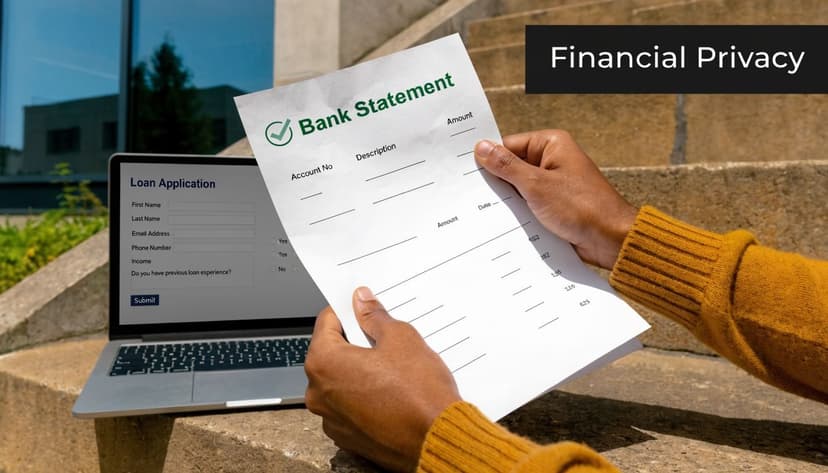
In practice, a redacted bank statement helps solve a narrow problem. Someone needs proof of identity, address, income flow, account ownership, or balance history. They do not need unrestricted access to every data point on the statement.
What a redacted statement does
A proper redacted copy balances two goals:
- Proof: It still shows enough to support the purpose of the request.
- Privacy: It removes details that increase fraud, identity theft, or misuse risk.
That distinction matters when you’re handling loan files, due diligence packages, litigation support, landlord requests, or onboarding documents for regulated vendors.
What it is not
A redacted bank statement isn’t a falsified one. It doesn’t change balances, alter dates, or edit transactions to create a different financial picture. It limits unnecessary disclosure.
Practical rule: Redaction should reduce exposure, not change meaning.
That’s why finance teams increasingly treat redaction as part of document hygiene. It belongs in the same conversation as file retention, access controls, and secure transfer.
If you’re also thinking beyond one file and trying to reduce exposure across the web, this guide to removing personal data is useful context. It covers the broader issue many clients face after their information starts circulating outside its original purpose.
There’s also an operational angle. The cleaner your source files are, the easier it is to move into extraction and review workflows later. Teams that rely on automated data entry software already know this. Security decisions made at the document stage affect everything that happens next.
The Legal and Practical Need for Redaction
A lender may need to confirm that funds exist. A visa officer may need to verify identity and address consistency. Counsel in a dispute may need a limited production. In each case, the recipient needs some facts from the statement, but usually not all of them.
That’s the practical reason redaction exists. The legal reason is sharper.
Why accountants can’t treat this casually
The Gramm-Leach-Bliley Act, enacted on November 12, 1999, requires financial institutions to safeguard customers’ nonpublic personal information, including redacting sensitive details such as full account numbers from bank statements shared externally. The same source notes that U.S. financial services reported a 30-50% reduction in compliance violations after adopting AI redaction software (Wondershare).
For a CPA, that legal framework turns a simple admin task into a control issue. Once a statement leaves your system, you need to be able to defend why specific fields remained visible and why others did not.
What requesters usually need
Different reviewers need different slices of the document:
- Mortgage underwriters: Name, address, statement period, and evidence of available funds.
- Visa and immigration files: Identity consistency, account ownership, and often proof of ongoing financial capacity.
- Auditors and legal teams: Targeted support for a specific claim, transaction class, or time period.
- Business due diligence reviewers: Financial credibility without full exposure of internal banking identifiers.
That means a one-size-fits-all approach causes problems. Over-share, and you create unnecessary risk. Over-redact, and the reviewer may reject the file.
PII is broader than most people think
A lot of teams still think only in terms of account numbers and Social Security numbers. In reality, personal exposure often comes from combinations of fields, especially when transaction descriptions, addresses, identifiers, and account references appear together. A good working reference is this understanding of Personally Identifiable Information (PII), because it helps teams identify what should trigger caution before a file is sent.
Bank statements often contain enough linked data to identify a person even when one obvious field has been hidden.
That’s one reason paper-era habits don’t hold up well in digital workflows. If your team still relies on physical destruction practices for sensitive files, it’s worth comparing that with modern document handling through this look at an alternative to shredding paper.
In accounting work, redaction is rarely optional. It’s part privacy duty, part compliance control, and part client protection.
Common Redaction Mistakes That Expose Your Data
The most common mistake is also the most dangerous. Someone opens a PDF, draws a black rectangle over the account number, saves the file, and assumes the problem is solved.
It usually isn’t.
The black-box problem
A visual cover-up is not the same as data removal. Think of it this way: drawing a black box over text is like painting over a window. The view looks blocked, but the structure underneath is still there. True redaction is more like bricking the window up so nothing can be seen through it or recovered later.
That distinction matters because PDF files often preserve underlying text layers, object data, or metadata. A reviewer, opposing party, or bad actor may be able to recover what was supposedly hidden.
Where firms get into trouble
Under GLBA Section 502(d), financial institutions are prohibited from disclosing unencrypted customer account numbers to third parties. Separate empirical analysis cited by the NCUA found that firms submitting redacted documents faced loan spreads higher by 45 basis points on average, maturities shortened by 0.8 years, and stricter covenant intensity, showing that information withholding can create real financing trade-offs in practice (NCUA).
The takeaway for CPAs is nuanced. You must protect sensitive data, but you also need to preserve enough legitimate information for the recipient to make a decision without assuming concealment signals risk.
Mistakes I see repeatedly
- Using annotation tools: Comment, highlight, and drawing features often sit on top of content instead of removing it.
- Redacting entire rows: This may hide one field, but it also destroys context the reviewer needs.
- Ignoring secondary identifiers: Routing numbers, reference IDs, signatures, and QR or barcode areas often remain visible.
- Forgetting page edges: Headers, footers, summary panels, and continuation pages frequently contain duplicated identifiers.
A reviewer can only assess what the document still communicates. If the statement becomes confusing, it may be rejected. If the hidden fields are recoverable, it creates security exposure.
For a useful reminder of how much detail lives inside an ordinary statement, this breakdown of what does a bank statement show is worth reviewing before you decide what to remove.
A Step-by-Step Guide to Secure Redaction
The safest workflow is boring on purpose. It should be repeatable, reviewable, and easy for staff to follow under deadline pressure.
Start with field selection. Then choose the method. Then validate the result.
What to redact
On most bank statements, these fields should be reviewed first for removal:
- Full account numbers: These are the clearest priority.
- Routing numbers and similar banking identifiers: Including ABA details and comparable codes where shown.
- Transaction reference IDs: These can expose internal trails or linked payment systems.
- Merchant details or descriptions: Especially when they reveal sensitive behavior, counterparties, or account-linked services.
- Online banking usernames or identifiers: These don’t belong in external packets.
- Signatures, QR codes, and barcodes: These often get missed and can carry more data than people expect.
What to keep
A usable redacted bank statement still needs enough context to serve its purpose.
| Keep visible | Why it usually matters |
|---|---|
| Name | Confirms account holder identity |
| Address | Supports proof-of-address use cases |
| Statement date or period | Shows timing and relevance |
| Limited transaction context | Helps verify activity where needed |
| Balances when required | Supports funds or liquidity review |
The rule is simple. Keep only what the recipient needs to answer the actual question.
Choose the right method
There are two practical approaches.
Physical method
Print the statement. Use an opaque black marker. Re-scan the pages. Save as a fresh PDF.
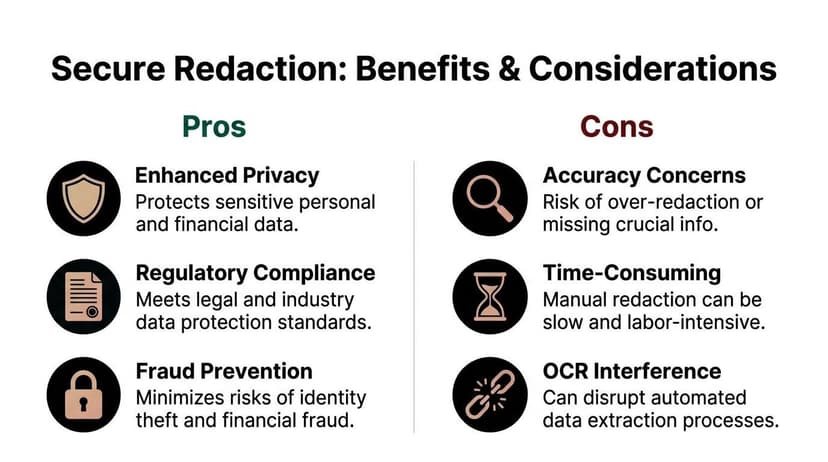
This can work for a low-volume, one-off document. But it has drawbacks. It’s slower, quality can degrade, and thick manual marks often interfere with later OCR.
Digital method
Use dedicated redaction software that identifies sensitive financial patterns and permanently removes them from the file structure. According to Redactable, visual masking often fails to delete underlying text layers, and a 2023 analysis found 68% of manually redacted financial documents exposed full account details. The same source explains that expert tools use pattern-based detection for identifiers such as IBANs and ABA numbers, then perform vector-based excision by rewriting the PDF object stream so the hidden data can’t be recovered (Redactable).
That’s the standard worth aiming for.
Best practice: If the file remains text-selectable after “redaction,” test whether the removed content is actually gone, not just hidden.
A short explainer can help if your team needs to see what proper PDF redaction looks like in practice.
A workflow that holds up in real firms
- Start with the original file. Don’t redact a screenshot or a photo if the source PDF exists.
- Duplicate the working copy. Preserve the original unchanged in your secured system.
- Mark only required fields. Redact narrowly. Don’t wipe whole sections unless the request requires it.
- Apply permanent redaction. Use a tool that removes data, not one that merely draws over it.
- Export a clean review copy. Open it again and inspect every page.
- Have a second person review high-risk files. A quick independent check catches obvious misses.
What works best is consistency. Redaction should operate like a checklist-driven control, not an improvised art project.
How Redaction Impacts OCR and Automated Workflows
Most privacy guides stop once the file is “safe to send.” That’s not enough for accounting teams. The document usually has a second life after sharing. It gets extracted, indexed, reconciled, or imported into another system.
That’s where redaction quality starts affecting automation.
Good redaction preserves structure
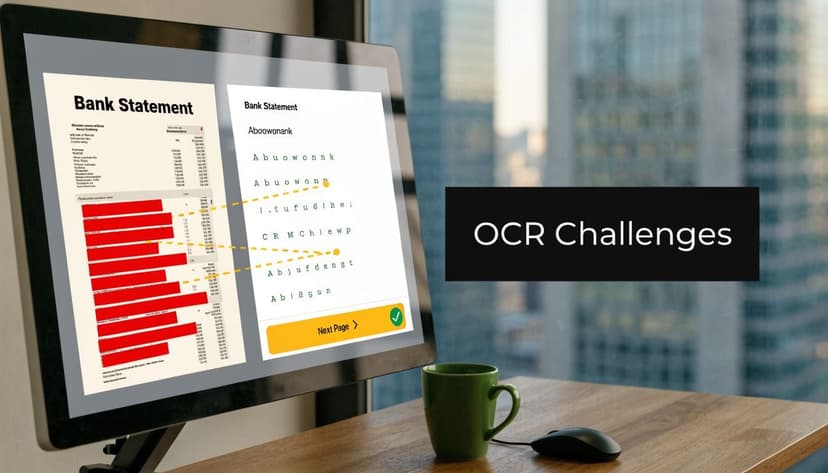
OCR systems read more than words. They also infer layout, row boundaries, column relationships, and repeating patterns. If you redact neatly and precisely, the document can still preserve enough structure for extraction.
If you redact badly, the OCR engine loses that structure. Common failure modes include:
- Blacking out whole transaction rows
- Using thick freehand marks that spill into adjacent columns
- Scanning at poor quality after manual marker redaction
- Flattening the file in a way that turns a usable PDF into a noisy image
A redacted bank statement should remove sensitive fields while leaving dates, amounts, and non-sensitive transactional context readable where the workflow requires them.
Why automation does better with precision
OCR-driven redaction tools can improve both speed and consistency before the file reaches your extraction stack. Redactor AI states that automated OCR-driven redaction is 98% faster than manual methods, with an example of 30 seconds versus 25 minutes per 10-page document. The same source says neural-network-based detection and multi-model validation reduce error rates from 15% in manual PDF editor workflows to under 0.5% (Redactor AI).
For finance operations, that matters in two ways:
- Security improves because the system consistently finds structured identifiers.
- Extraction improves because the redactions are cleaner and more predictable.
A statement can be secure and still be machine-readable. That only happens when the redaction is targeted.
If your team works with scanned PDFs and image-heavy statements, this overview of OCR in banking is useful background. It explains why tabular integrity matters so much once documents move into automated processing.
A practical rule for downstream use
Don’t redact by area. Redact by field.
That means removing the account number itself, not the entire header block. It means hiding the specific transaction memo that creates exposure, not wiping the full transaction line if the amount and date still need to be analyzed.
The firms that get this right treat privacy and extraction as a single workflow, not two separate tasks.
Verifying Your Redaction and Fixing Common Issues
A file isn’t finished when the redaction marks are applied. It’s finished when you’ve tested that the hidden data is gone and the remaining document still works for its intended use.
How to test the file
Run a few simple checks before sending anything out:
- Try copy and paste: If text under a redacted area can still be selected or pasted elsewhere, the file isn’t secure.
- Search the PDF: Look for fragments of account numbers, names, or identifiers you intended to remove.
- Inspect every page edge: Headers, footers, continuation lines, and summary areas often contain duplicate data.
- Use a fresh save path: If needed, print to PDF as part of the quality-control process, then review the output again.
When a redacted statement gets rejected
The rejection usually falls into one of three buckets:
| Problem | What likely happened | What to fix |
|---|---|---|
| Too much hidden | The reviewer can’t verify the purpose | Restore non-sensitive proof elements |
| Sensitive data still visible | A field or duplicate identifier was missed | Re-review all pages and summary sections |
| OCR failed later | Manual marks damaged layout or clarity | Recreate with cleaner, field-level redaction |
If the statement is image-based, quality matters even more. Blurry scans, skewed pages, and dark marker bleed can make verification and extraction harder than they need to be. This guide on working with bank statement images is helpful when the source file isn’t a clean digital PDF.
A final review step saves headaches. In practice, the second pair of eyes is often what catches the routing number in the footer or the identifier repeated on page two.
Frequently Asked Questions About Redacting Bank Statements
Can I just use a black marker on a printed copy and scan it
You can, and for a one-off file it may be acceptable if the marks are fully opaque and the scan is clear. But it’s slower, harder to review, and more likely to create OCR problems later. Dedicated redaction software is more reliable for repeat work.
Is it illegal to redact a bank statement
No. It’s generally appropriate to redact your own bank statement when you’re protecting sensitive information for a legitimate reason. What crosses the line is changing or falsifying the substance of the document. Removing unnecessary identifiers is different from altering balances, dates, or meaning.
Will my bank redact a statement for me
Sometimes a bank may offer limited masking on generated statements or portal views, but you shouldn’t assume they’ll tailor the document for your exact use case. Most accountants still need their own redaction process because the recipient’s requirements vary.
What’s the difference between redaction and annotation
Annotation adds a visual layer. Redaction removes information so it can’t be recovered. If the content still exists underneath the black area, that’s annotation, not real redaction.
What should stay visible on a redacted bank statement
Usually the name, statement period, and any proof elements tied to the request should remain visible. The exact answer depends on why the statement is being shared.
Why does OCR fail on some redacted statements
OCR usually breaks when the redaction is messy, too broad, or applied after low-quality rescanning. A precise redaction leaves the document structure intact. A sloppy one turns a bank statement into an image full of obstacles.
If your team needs to turn secure bank statements into usable accounting data after redaction, ConvertBankToExcel is built for that workflow. It converts scanned or digital statements into structured Excel, CSV, and accounting-ready outputs while preserving the speed finance teams need and the control client files demand.